
A metric is the number DataTile calculates for each cell of a crosstab, chart or dashboard widget: a count, a base, a percentage, a mean, an index. You can show several metrics at once, and each is calculated independently from the same respondents.
This section explains what every metric means and exactly how DataTile calculates it. To switch metrics on or off, rename them or change their decimals for a whole database, see Metric settings.
Pages in this section
-
Counts, bases and percentages: Count, Sample Count, Vert Base, Horiz Base, the unweighted bases, Vert%, Horiz%, Base%.
-
Numeric metrics: Vol, Mean, Median, Min, Max, Vert SOV, Horiz SOV.
-
Affinity index: Aff.idx, Aff.idx (Unfiltered), Aff.idx (Total).
-
Correl: Pearson's correlation coefficient.
-
Multi-response metrics: Count MR, Volume MR, Mean MR, Vert Base MR, Vert% MR, CpC, CpC.B.
-
Rotated databases: what rotated (looped) data is, and the metrics for it: Cases, UQ Base, Pen, Total UQ Base, Total pen.
-
Other metrics: F.count, Top Label, First Label, Prob Share, and the TURF metrics.
Where you choose metrics
-
Crosstab (DVI): click Metrics above the table and tick the metrics you need. Hover over a metric to see its description. The flip button moves metrics between rows and columns. To change the decimals of one column only, use the column menu.
-
Charts and dashboards: a widget shows the metrics of the query it was built from. In the chart editor you choose which metric each label displays.
-
Dashboard Data API:
GET /api/database/{databaseId}/metriclists the metrics of a database with their IDs; a query asks for metrics by ID.
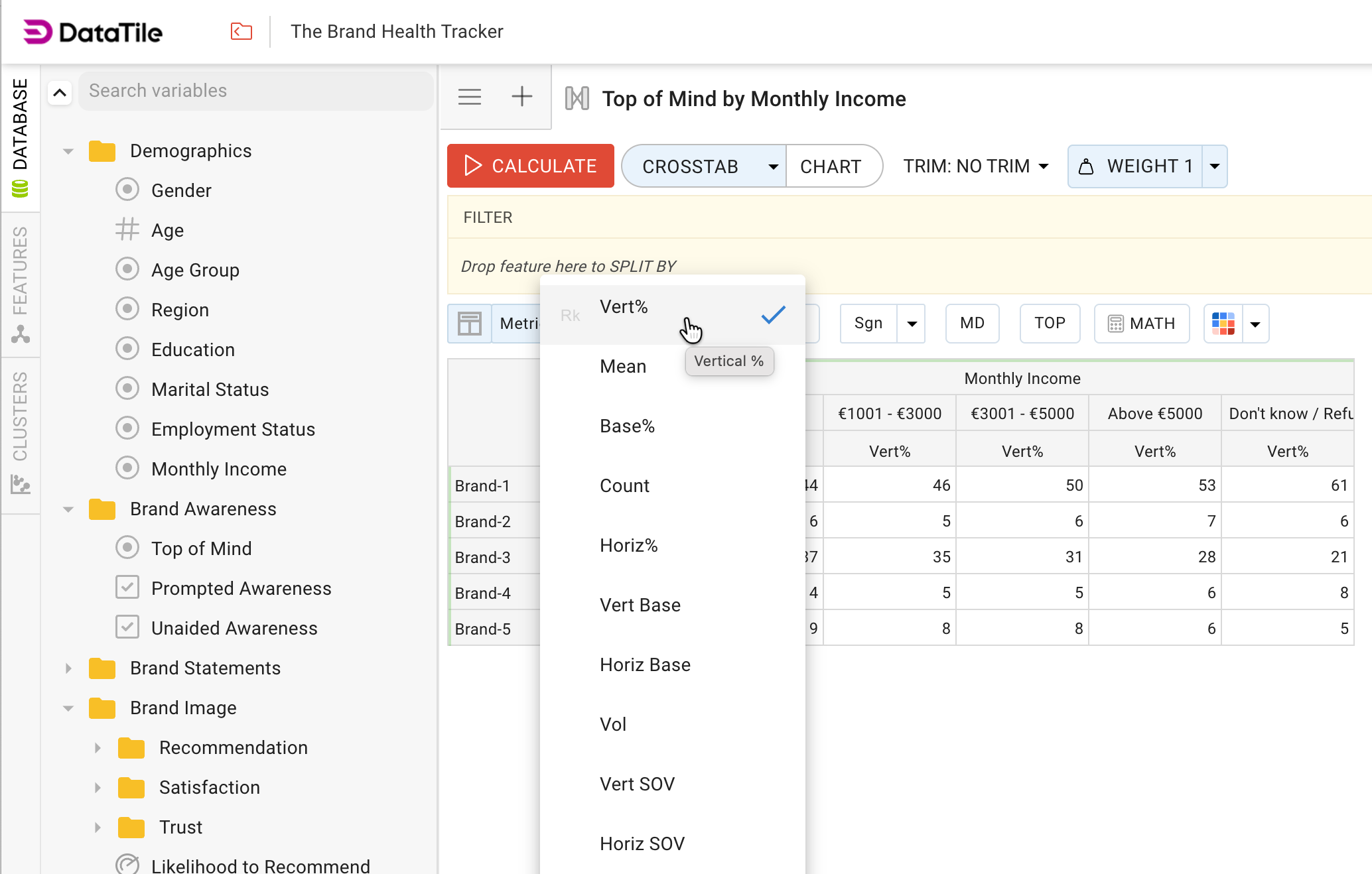
The list only shows the metrics enabled for the database. If a metric is missing, ask the database owner to enable it in Metric settings. The rotated-data metrics appear only after rotation is enabled for the database.
Terms used on these pages
|
Term |
Meaning |
|---|---|
|
Row, column |
A crosstab crosses the categories of the row variable with the categories of the column (banner) variable. A cell holds the respondents who are in both its row and its column. |
|
Respondent, record |
A record is one row of the data file. In an ordinary survey file every record is one respondent. In a rotated file a respondent can have several records, see Rotated databases. |
|
Base |
The group of respondents a percentage or an average is calculated from. Which respondents belong to the base depends on missing values, rebasing, filters and splits. |
|
Missing values (SYSMIS) |
A respondent with no answer to a variable. By default DataTile leaves them out of the base (Ignore sysmis). The setting can be changed for the database and for each variable, see Handling missing values. |
|
Rebase |
A condition attached to a row or column that narrows its base, for example "only those aware of the brand". See Rebase data. |
|
Filter, split |
A filter removes respondents from every calculation in the query. A split calculates the whole table separately for each split category. |
|
Weighted, unweighted |
When a weight is active, each respondent counts with their weight instead of 1. Most metrics are weighted. Sample Count, Unweighted Base and Unweighted Horiz Base are not, see Setting up and applying weights. |
Behaviour shared by all metrics
-
Empty cells. When no respondent falls into a cell, its metrics have no value rather than 0, and a percentage with no base has no value either.
-
Rounding. Each metric is rounded to its own number of decimals, half away from zero (2.45 with one decimal becomes 2.5). Percentages are rounded after multiplying by 100. Negative decimals round to tens, hundreds and so on: −2 turns 1,455,675 into 1,455,700.
-
Hidden metrics requested through a saved query or the Dashboard Data API come back without values.
-
Significance testing works with Count, Vert%, Horiz%, Mean, Cases and Pen. All other metrics are shown without significance marks. See Significance Testing.
All metrics at a glance
Names are the defaults; a database owner can rename them. The ID is fixed. It appears under the metric name in Metric settings and is used by the API. "On" means the metric is switched on in a new database.
|
Metric |
ID |
What it shows |
Calculation |
Default |
|---|---|---|---|---|
|
Counts and bases |
||||
|
Count |
|
Respondents in the cell |
Weighted number of respondents |
On |
|
Sample Count |
|
Respondents in the cell, without weighting |
Unweighted number of respondents |
On |
|
Vert Base |
|
Base of the column |
Weighted respondents in the column who are in the base of the row variable |
On |
|
Horiz Base |
|
Base of the row |
Weighted respondents in the row who are in the base of the column variable |
On |
|
Unweighted Base |
|
Vert Base without weighting |
Unweighted Vert Base |
Off |
|
Unweighted Horiz Base |
|
Horiz Base without weighting |
Unweighted Horiz Base |
Off |
|
Percentages |
||||
|
Vert% |
|
Share of the column |
Count ÷ Vert Base × 100 |
On, always |
|
Horiz% |
|
Share of the row |
Count ÷ Horiz Base × 100 |
On |
|
Base% |
|
Share of the whole table |
Count ÷ respondents in the base of both variables × 100 |
On |
|
Numeric metrics |
||||
|
Vol |
|
Sum of values |
Σ weight × value |
On |
|
Mean |
|
Average value |
Vol ÷ weighted respondents with a value |
On |
|
Median |
|
Middle value |
Weighted median, interpolated for categorical variables |
Off |
|
Min, Max |
|
Smallest and largest value |
Unweighted |
Off |
|
Vert SOV |
|
Share of the column's volume |
Vol ÷ Vol of the column × 100 |
On |
|
Horiz SOV |
|
Share of the row's volume |
Vol ÷ Vol of the row × 100 |
On |
|
Indices and relationships |
||||
|
Aff.idx |
|
Over- or under-representation of the row in the column |
Vert% ÷ (Horiz Base ÷ total base) × 100 |
Off |
|
Aff.idx (Unfiltered) |
|
The same, compared with the unfiltered sample |
Reference share calculated without the filter |
Off |
|
Aff.idx (Total) |
|
The same, compared with everyone who answered the row variable |
Reference share ignores the column variable |
Off |
|
Correl |
|
Strength of the link between row and column |
Pearson's r, from −1 to 1 |
On |
|
Multi-response metrics |
||||
|
Count MR |
|
Mentions in the cell |
Weighted number of selected answers |
Off |
|
Volume MR |
|
Sum of the mentioned values |
Σ weight × value over mentions |
Off |
|
Mean MR |
|
Average value per mention |
Volume MR ÷ Count MR |
Off |
|
Vert Base MR |
|
All mentions in the column |
Weighted mentions of the whole set |
Off |
|
Vert% MR |
|
Share of all mentions |
Count MR ÷ Vert Base MR × 100 |
Off |
|
CpC |
|
Mentions per respondent in the cell |
Count MR ÷ Count |
Off |
|
CpC.B |
|
Mentions per respondent in the base |
Count MR ÷ Vert Base |
Off |
|
Rotated databases only |
||||
|
Cases |
|
Unique cases in the cell |
Weighted number of distinct IDs |
On |
|
UQ Base |
|
Unique cases in the column base |
Vert Base counted in distinct IDs |
On |
|
UQ Base (unweighted) |
|
UQ Base without weighting |
Number of distinct IDs |
Off |
|
Pen |
|
Penetration: share of cases in the column |
Cases ÷ UQ Base × 100 |
On |
|
Total UQ Base |
|
Unique cases who answered the row variable |
Distinct IDs, column ignored |
On |
|
Total pen |
|
Share of cases among all cases in the base |
Cases ÷ Total UQ Base × 100 |
On |
|
Other metrics |
||||
|
F.count |
|
Distinct codes of the Value variable |
Unweighted number of distinct codes |
Off |
|
Top Label |
|
Most frequent label in the cell |
Label with the largest weighted count |
Off |
|
First Label |
|
First label in the cell |
Label of the first record in file order |
Off |
|
Prob Share |
|
Average probability in the column, for probabilistic variables |
Σ weight × probability ÷ Vert Base × 100; equals Vert% otherwise |
Off |
|
Reach, Cumulative, Unduplicated |
|
TURF results |
See TURF in DataTile |
On, TURF only |