
This article provides detailed instructions on how to correctly declare and describe variables in a codebook. The codebook is uploaded as a separate file together with the database and serves as a complete data map, defining the structure and properties of the variables in DataTile.
Each variable in the VARIABLES sheet of a Codebook must have a declared TYPE that defines how DataTile interprets and processes it. The simplest variable types – TXT, NUM, and DATE – do not use value-label dictionaries and are used to store free text (open-ended answers, titles, and other verbatim), numeric measures (age, income, mileage, consumption, time spent), or dates (fieldwork date, event timeline, etc.). Categorical variables and MR-sets declarations have their own specifics, which are covered in detail in this article.
Type TXT: Text variables
Stores open-ended or string data exactly as they appear in the source file. For example:
|
TYPE |
NAME |
LABEL |
|---|---|---|
|
TXT |
serial |
Serial Hash |
|
TXT |
car |
Respondent’s primary car brand |
|
TXT |
fb |
Post-maintenance feedback |
TXT variables are not aggregated in analyses but can be searched, filtered, displayed on the dashboard, or included in reports.
DataTile provides specific verbatim processing tools:
-
Text Refiner – rectifies typos and codes titles into legit brand names or products.
-
Semantic Coder (LAB stage) – a comprehensive AI-powered coding solution.
Type NUM: Numeric variables
NUM represents continuous or discrete numeric values such as age, counts, scores, or percentages.
Declaration Example:
|
TYPE |
NAME |
LABEL |
MEASURE |
|---|---|---|---|
|
NUM |
wght_sc |
Weight |
WT |
|
NUM |
age |
Respondent’s primary car brand |
|
|
NUM |
AIR_B1 |
Bloomberg - Average Issue Readership - personal probability |
PROB |
|
NUM |
AIR_B2 |
CNN - Average Issue Readership - personal probability |
PROB |
You can categorise them for analysis. For example, recode into the ‘Age groups’ categorical variable. Calculate value statistics like Average, Share of Voice (SoV), Volume, etc.
Type DATE: Date variables
DATE variables contain store timestamps, such as interview completion dates.
|
TYPE |
NAME |
LABEL |
|---|---|---|
|
DATE |
completed |
Interview completion date |
|
DATE |
dob |
Date of birth |
DataTile can help you automatically categorise DATE variables into waves or intervals.
-
DataTile supports SPSS and Excel date types. When loading a CSV data file, ensure that dates follow a recognised date format (e.g.,
YYYY-MM-DD). -
Can be used for time-based filtering, grouping, or duration calculations.
-
You can also categorise date variables by cutting them into custom intervals.
Type CAT: Categorical variables
Categorical variables represent discrete response options, such as gender, region, or product choice. Each category (response option) corresponds to a numeric VALUE defined in the VALUES sheet and displayed through a user-friendly LABEL.
Thus, categories of each categorical variable should be defined in the VALUES sheet of the codebook. This creates a category dictionary.
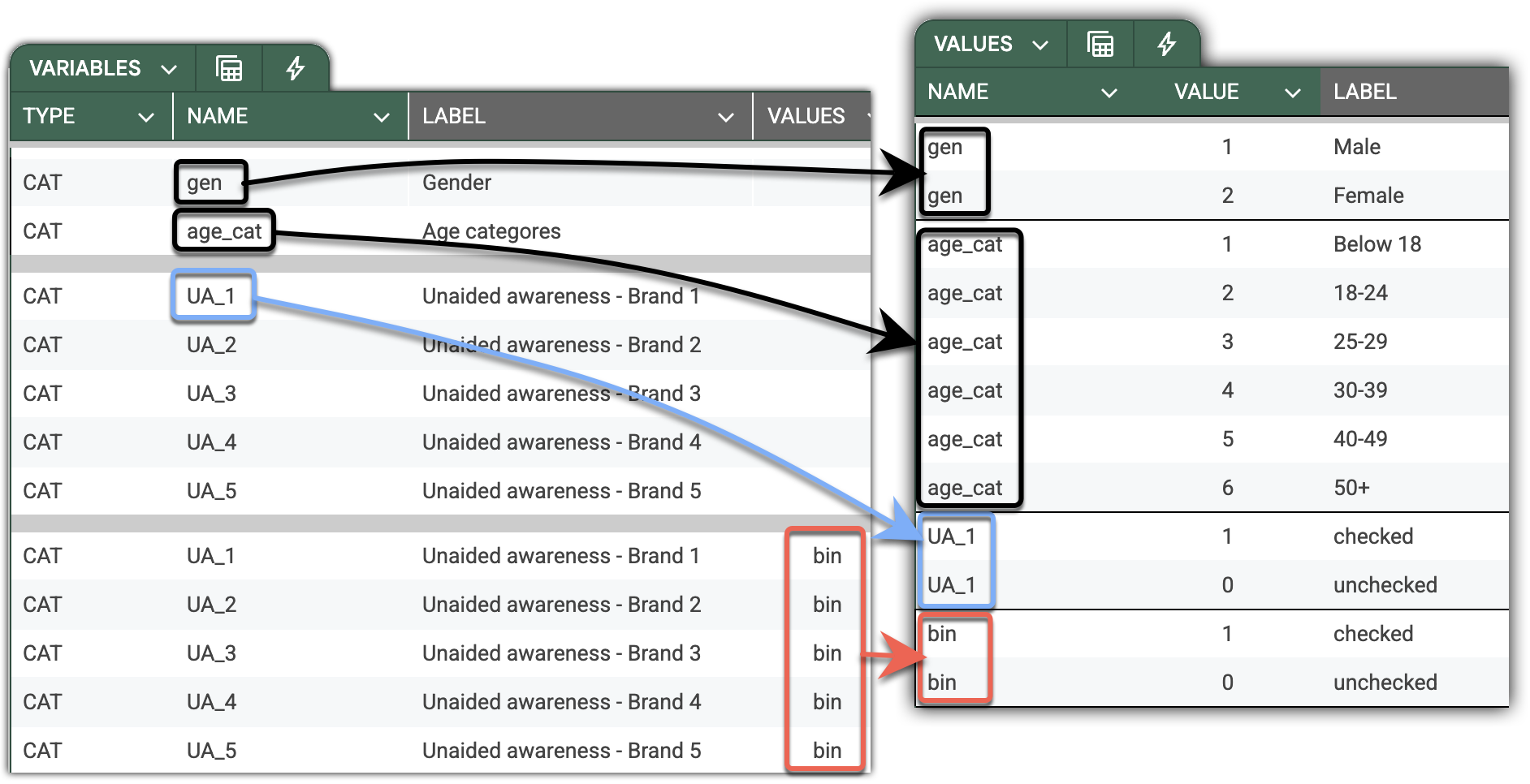
Spare effort by creating reusable dictionaries for cognate variables such as multi-responses, NPS, and Likert scales. You can override the variable dictionary by referencing a common one in the VALUES column.
In the screenshot below, you can see two equivalent declarations of the same set of ‘Unaided awareness’ variables. The first one (blue) assumes that value labels are declared for each UA_* variable. However, if multiple cognate variables share an identical category set, you can define a common value (bin for binary in our example, but you are free to invent names you like) for all of them and define categories on the VALUES sheet only once (pink).
For sets of cognate variables with a clear naming pattern like ‘Unaided awareness’ in our example, you can make the declaration even more succinct - with just a single line - using patterns for bulk declarations of variables, which are described below.
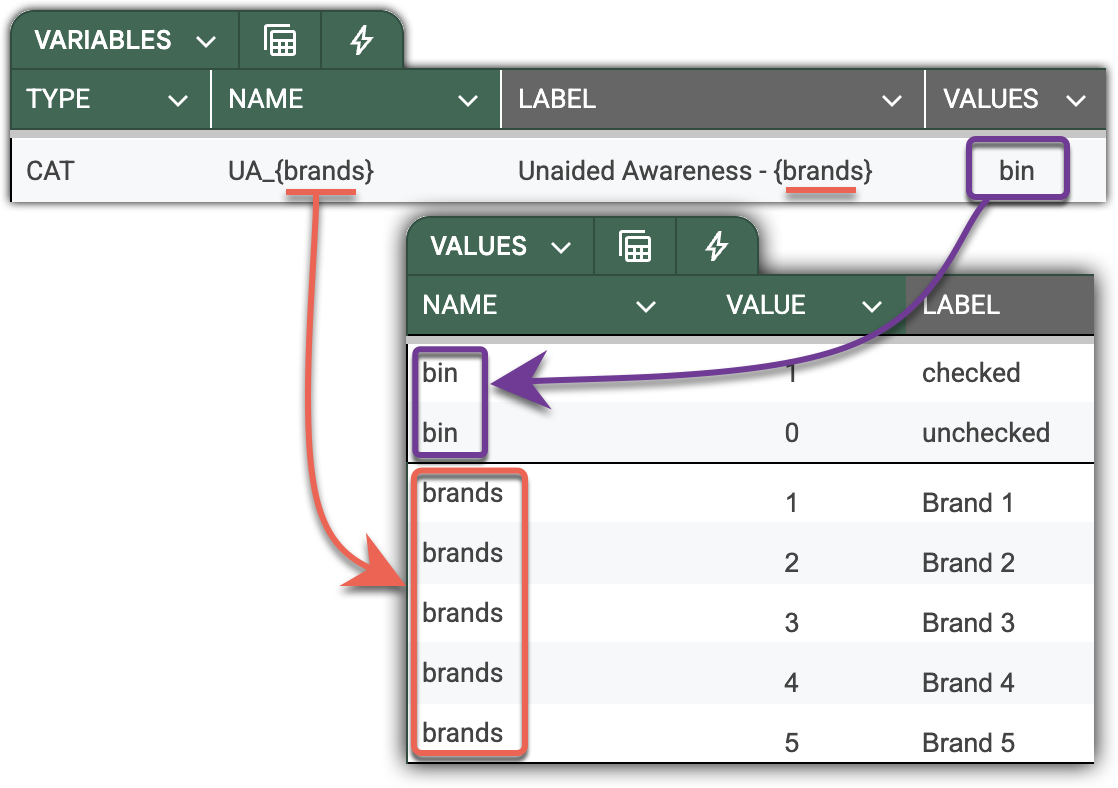
For sets of cognate variables with a clear naming pattern like “Unaided awareness” in our example, you can make the declaration even more succinct - with just a single line.
First, introduce the Brand dictionary on the VALUES sheet, and use it to define the naming pattern. The following illustration depicts a single-line declaration for the whole set of “Unaided awareness” questions. Note that the pattern applies synchronously to variable names and labels, virtually untangling them into five variables (in this case).
Dictionaries are a powerful tool. They are a single point of control, allowing consistent declaration of variables across the entire survey, thereby eliminating the risk of human errors by design.
Key properties and usage:
TYPE – Must be CAT to indicate a categorical variable.
VALUES – Refers to a dictionary defined in the VALUES sheet. If left blank, DataTile automatically looks for a dictionary whose NAME matches the variable’s NAME.
LABEL – The variable’s display name in the DataTile interface and reports.
MEASURE – Specifies the subtype of the variable:
-
NOMINAL(default): unordered categories (e.g., Gender, Region). -
ORDINAL: ordered categories (e.g., Likert scales, Satisfaction levels).
MIDPOINT – Numeric equivalent assigned to each category in the VALUES sheet, used for calculating value-based statistics such as Average, Share of Voice (SoV), and Volume.
Best practices:
-
Use concise, interpretable, consistent variable names (e.g.,
AGE_CAT,BRAND,USAGE_FREQ). -
Maintain reusable dictionaries within and, when possible, across surveys (e.g., brand lists, Likert scales, attitudinal statements, etc.).
-
Maintain logical category order in the
VALUESsheet for ordinal variables. -
Assign
MIDPOINTvalues only to categories with a clear numeric progression. -
Use
MEASURE=ORDINALfor scales, levels, and scores where category order matters. -
Keep category lists concise – avoid unused or redundant codes.
Type MD: Dichotomous multi-response set
The MD (multi-response dichotomous) type is used for multi-choice questions where each answer is stored as a separate binary variable in the dataset. Each variable indicates whether the option was selected (1) or not (0). In this setup, 1 is called a ‘counted value’.
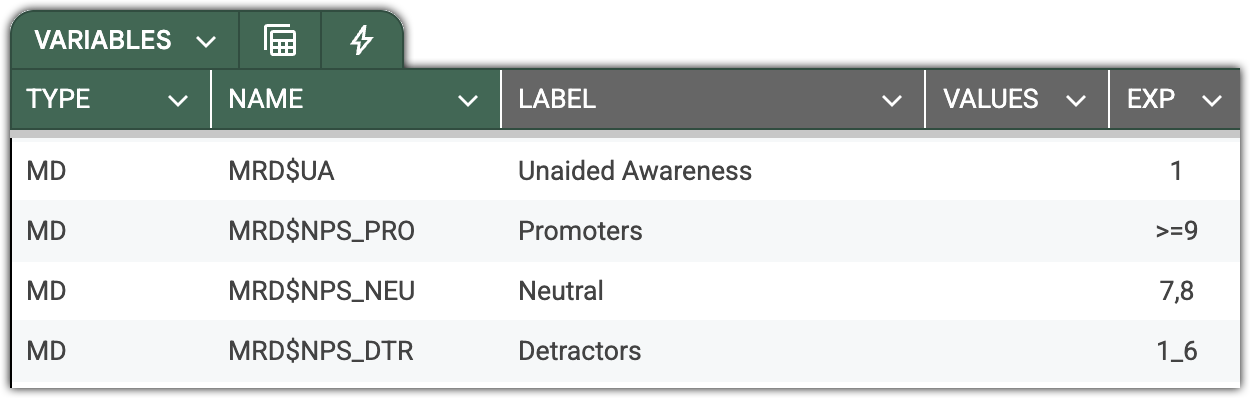
But it’s not rare to create MD from non-binary variables. For example, the NPS score. You can define Promoters MD from NPS values (spanning from 1 to 10) by providing the logical condition defining the counted value in the EXP (expression) column. This unique DataTile feature provides flexibility without the need to spawn recoded variables, as in SPSS.
DataTile treats all variables belonging to the same set as one logical multi-response question, aggregating selections automatically for reporting and analysis. Note the declarations of four MR sets in the screenshot below.
Key properties and usage:
TYPE MANDATORY – Must be set to MD to define a dichotomous multi-response variable.
VALUES MANDATORY – Refers to the list of variables constituting the MR-set and maps them to the corresponding categories.
The following illustration depicts 4 different ways to declare and map MR-set values to their variables.
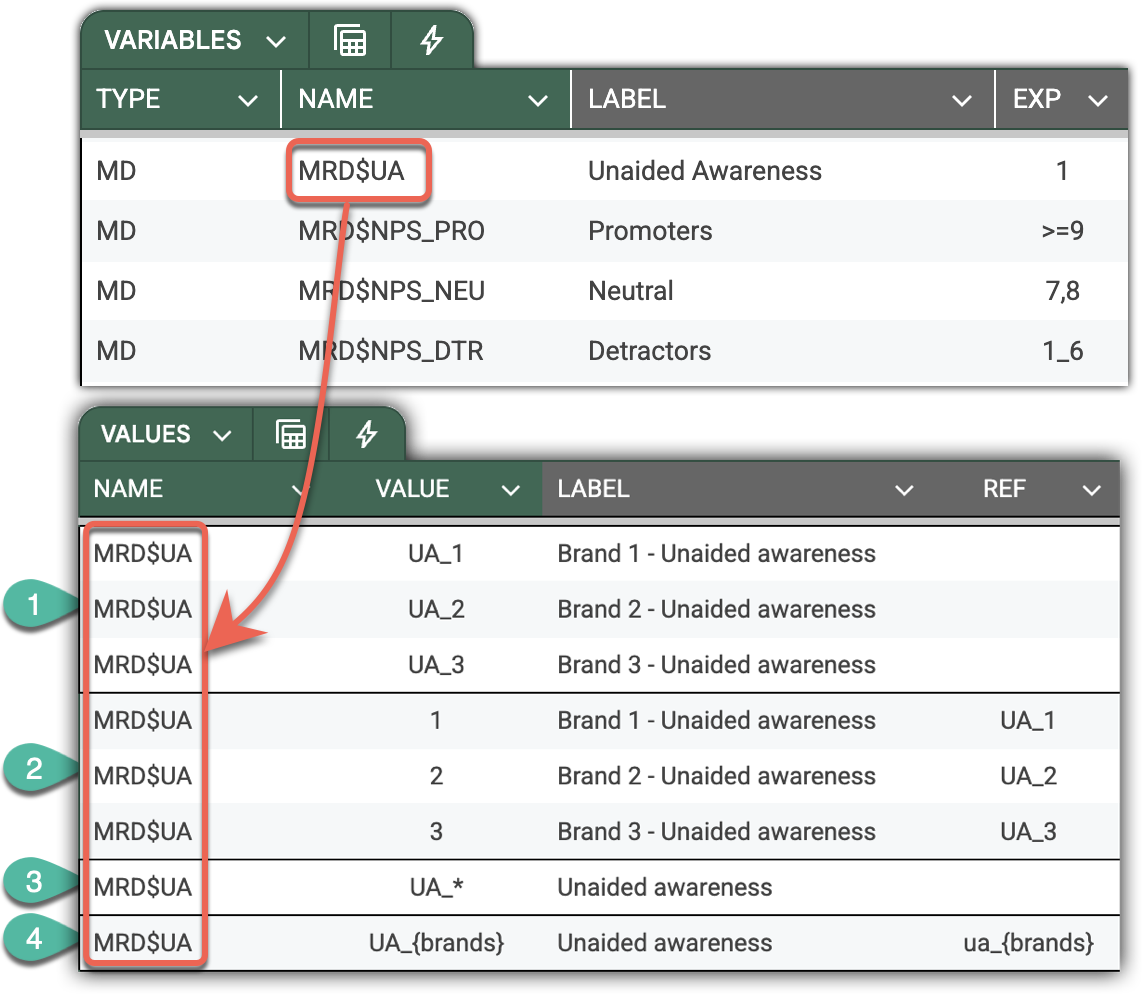
-
Manual and straightforward declaration with explicit inclusion of variables. Though totally legit, this declaration does not assume future-proof dynamics – it will not automatically expand the MR set if a new brand (option) would appear in a subsequent wave.
If your MR set variables have a consistent naming pattern, like in the example below, DataTile will derive and assign corresponding values to the categories of the MR set. -
Same as above, provides a way to define values of the MR set categories explicitly. Enter category values into the
VALUEcolumn and map them to the variable provided in theREFcolumn. Use this approach when the pattern doesn’t unambiguously determine the MR set constituents, or when the due values don’t match the codes. -
This robust single-line declaration works when your variables follow a clear naming pattern. The asterics notation can be trickier –
Q18_b*,Q18_S*_UA, etc.
Important: the pattern should contain one and only one asterisk.
This declaration enables agility, encompassing future changes in the brand list. I.e., DataTile will automatically add new variables matching the provided pattern. -
Same as 3, but allows high control by defining inclusion based on the dictionary.
EXP OPTIONAL – Defines the counted value — a logical condition that determines what qualifies as a ‘selected’ response. Unlike SPSS, DataTile expressions can be full logical conditions, not just single values.
For example:
-
1– counts value 1 as selected -
>0– counts any positive number as selected -
1_6– counts values from 1 to 6 inclusively as selected
Best practices:
-
Use consistent naming conventions (e.g.,
UA_BRAND_1,UA_BRAND_2,UA_BRAND_3) to leverage pattern-based MR set recognition. Prioritise numeric brand coding over alphabetic (if data provided in Excel). -
Keep one shared dictionary (e.g.,
bin) for all MD variables in the same dataset. -
Use clear and concise labels – typically the brand and the common part of the question.
-
Define a counted value with the logical condition in EXP.
-
Avoid mixing response codes (e.g., using
1/99orY/N) – map them through the MAP column if needed.
Type MC: Categorical Multi-response Set
The MC (multi-response categorical) type is used for multi-choice questions where each response option is captured as a separate categorical variable, rather than as a binary (0/1) indicator.
Each variable in the set can hold one of several categorical values corresponding to the respondent’s choice.
In this structure, the number of variables in the multi-response set equals the maximum number of choices made by any respondent across the dataset. Each variable thus stores one selected category from the same categorical dictionary.
Typical use cases include:
-
Product or brand usage questions allowing multiple mentions.
-
Main and secondary reasons for behaviour or attitudes.
-
Multiple mentions of media channels or sources of information.
Related articles
Bulk declarations of variables in the codebook