
We recommend compressing SPSS files into a .zip archive before uploading, as this significantly improves upload speed. Only ZIP archives are supported.
Checking for conflicts
When uploading a file in Add mode, DataTile automatically checks the new database against previously uploaded waves. If any conflicts are detected, a notification window opens displaying the list of identified issues. Below is an example of such a notification. The exact contents may vary depending on the type of conflict detected.
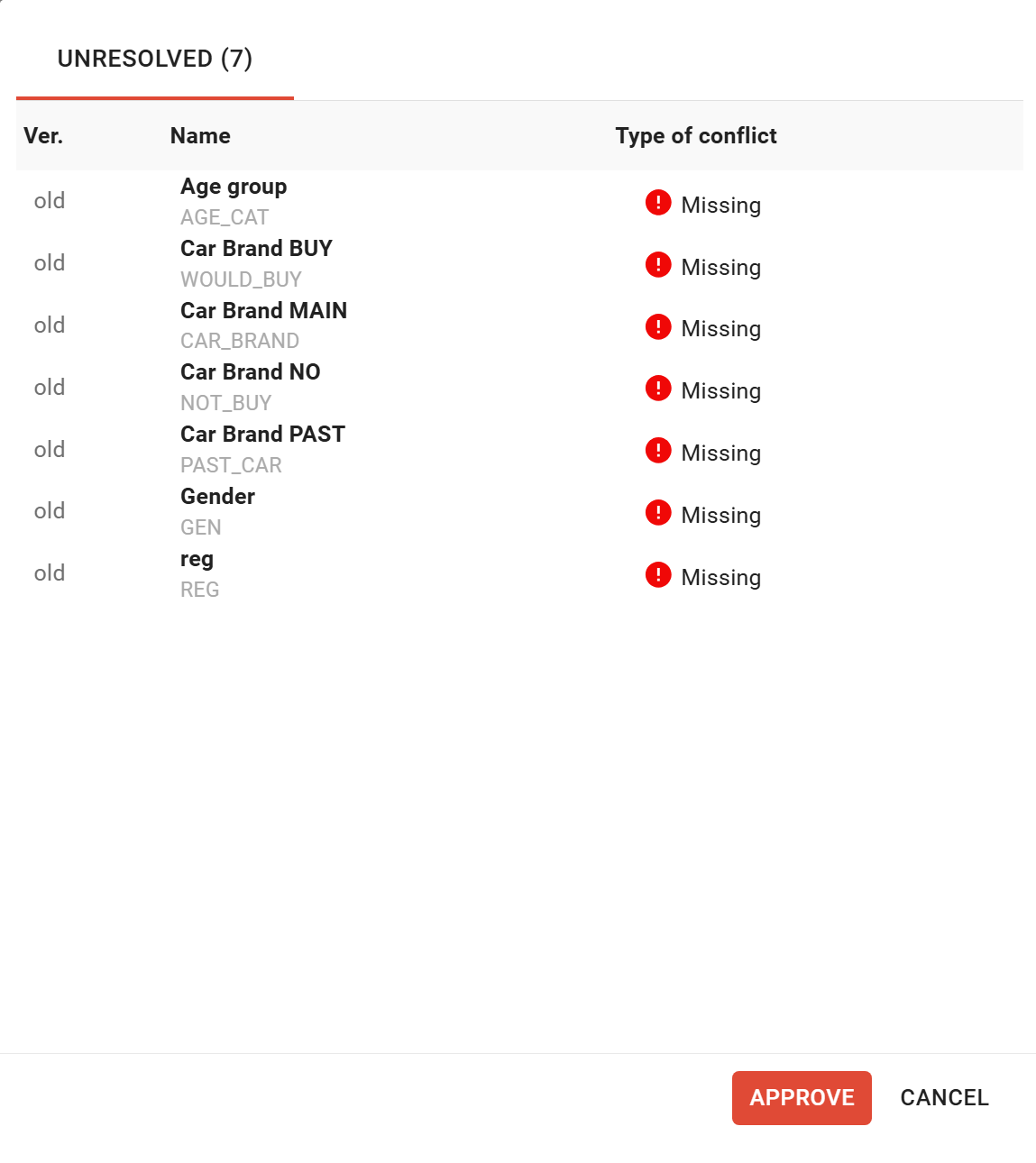
In DataTile, some issues are solved automatically. For example, if the variable was stored as a date in previous waves but arrives as a numeric variable in the new database, the system can recognize it as the same variable based on its code, structure, and content. As a result, the notification window displays only those conflicts that could not be resolved automatically in the background.
The conflict table contains the following columns:

-
Version – whether the conflict belongs to the old or new database.
-
Name – the variable label and code that help identify it within DataTile.
-
Type of conflict – the detected conflict type.
Conflict Type: MISSING
A Missing conflict appears when a variable exists in the previous database but is absent from the newly uploaded one.
In our example, the variable Car Brand BUY (and others) exists in the previous datasets but is missing in the newly uploaded database.
How to resolve the “missing variables” conflict
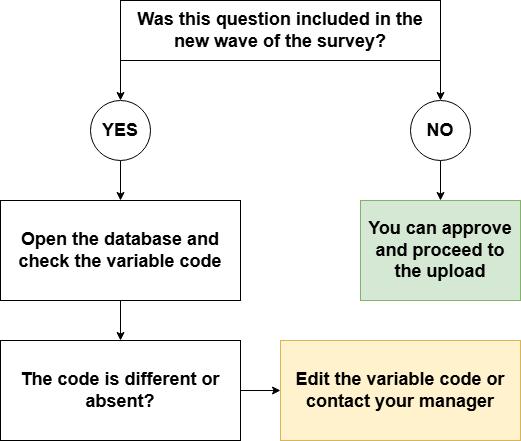
If the missing variable is expected, you can simply approve the conflict and proceed to the next step.
If the variable should be present, first verify the source database. Check whether the variable exists and whether its code is correct. If necessary, correct the variable code and upload the database again.
If the issue persists after the correction, contact your DataTile manager for assistance.
Question: Can I upload a database with unresolved conflicts?
Answer: Unresolved conflicts do not prevent the database from being uploaded. Their purpose is to draw your attention to data inconsistencies so that you can either review and accept them or correct them before proceeding. Once you have reviewed the conflicts, click Approve to continue the upload.
Conflict Type: TYPE MISMATCH
In some cases, a variable's data type in the newly uploaded database may differ from the type used in previous waves. When such a conflict is detected, DataTile describes it in the conflict window. You should verify that the variable has been imported with the intended data type before proceeding. These conflicts most commonly involve numeric and date variables.
In some cases, a data type mismatch creates an unresolvable conflict that prevents the database from being uploaded. After resolving the conflicts, you can continue the upload and verify the results.
Not every type mismatch prevents the upload. In some situations, DataTile allows the upload to continue even when variable types differ. The absence of a blocking error message and the active Approve button indicate that the conflict is considered non-critical.