
Net Promoter Score (NPS) is typically presented as an index calculated from the shares of promoters and detractors. This article explains the numeric recoding method for NPS analysis, significance testing, and implementation in crosstab workflows.
Step 1. Group your NPS variables
If you have multiple NPS questions, group them so that subsequent transformations apply consistently across all variables.

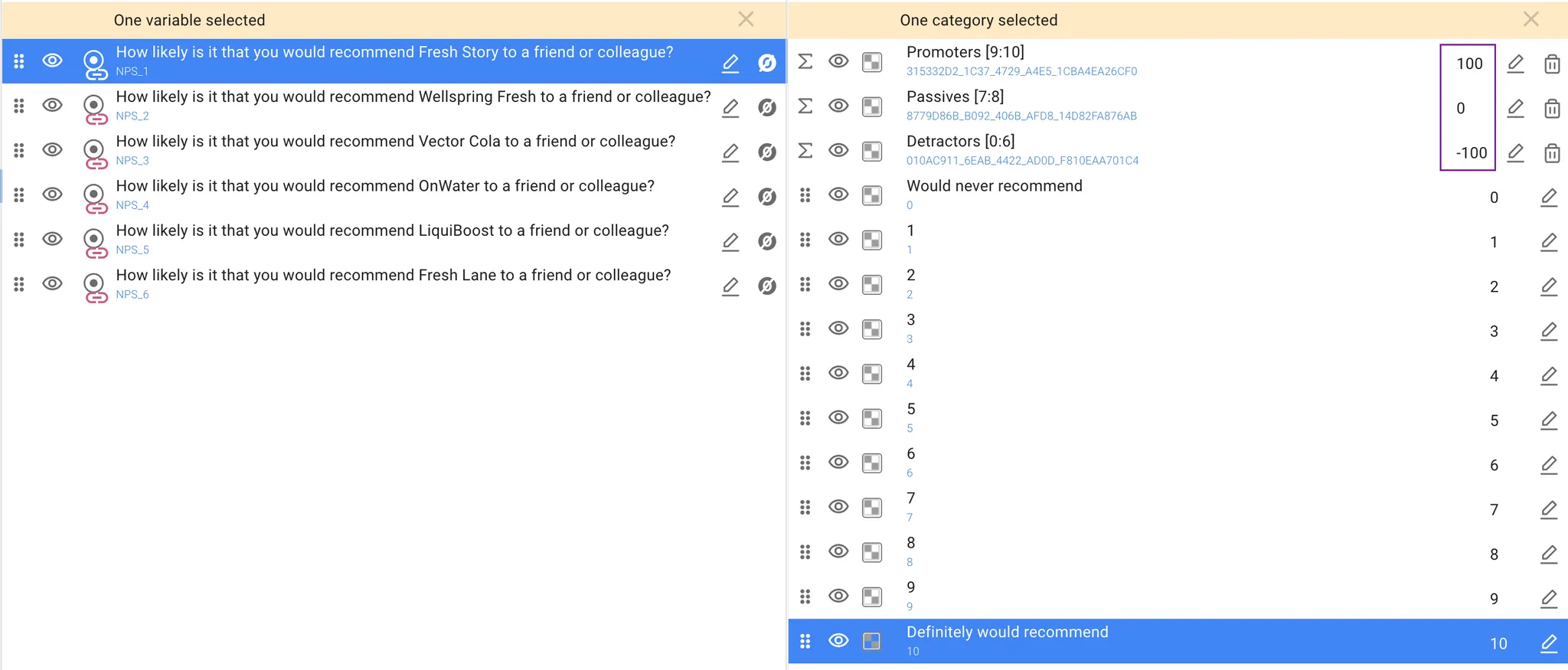
Step 2. Recode response categories
Within any of the grouped variables, create Promoters, Passives, and Detractors groups OR-junctions on the original 0–10 scale. Edit midpoints of the new groups:
-
Promoters → 100
-
Passives → 0
-
Detractors → –100
Step 3. Build a crosstab
-
Place the recoded NPS variables on Rows.
-
Select your grouping variable (e.g., brand, wave, region) and place it on Columns. Use ‘OR-join by variable’ if you have multiple NPS items.
-
Select the ‘Mean’ metric.
The resulting table will display NPS scores on the –100 to +100 scale.
Step 4. Statistical testing
In DataTile, the built-in statistical test method will be applied based on the type of metric being analyzed. For the ‘Mean’ metrics, a T-test will be applied automatically.
Please read the ‘Statistical Testing for Net Promoter Score (NPS)’ article for more detailed information on the principles of calculating statistical significance for NPS.
To avoid recoding, you may use the DataTile build-in tool for NPS calculation, where the process is streamlined: the score is calculated automatically when an NPS variable is created directly in Meta-Editor using the same principle as MR-set generation.