
Each DataTile server has a Supervisor who is responsible for:
-
Billing (licenses and quotas) + Add-ons
-
User management
Billing
The Supervisor has access to billing and monitors quotas according to the purchased license. The Supervisor must monitor statistics to avoid exceeding quotas, as this can result in a more expensive license.
For more regular monitoring, an automated email with server usage statistics is sent to supervisors on the first day of each month.
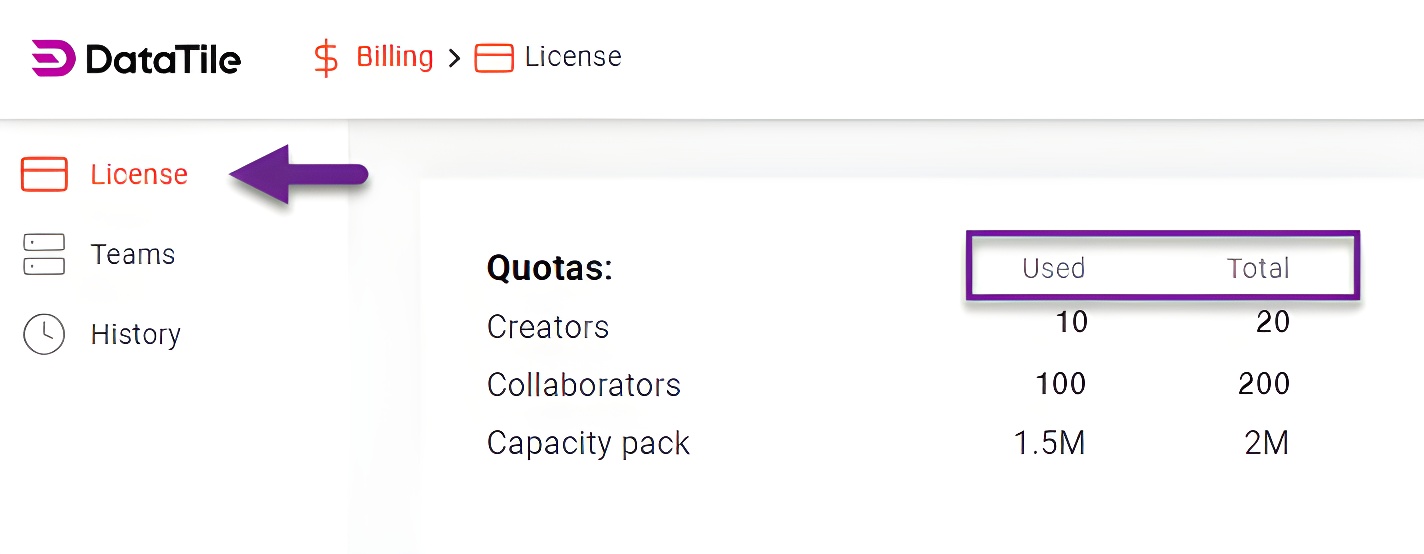
Three parameters affecting license cost:
-
Creators – users with any Creator role. A creator account includes one or more system roles, enabling users to create databases, dashboards, and other system entities, and to manage access permissions. The server Supervisor can assign or revoke these roles to control the number of creators against the licensed quota.
-
Collaborators – all DataTile users who have access to specific entities with at least Viewer permissions. If a collaborator receives a Creator role, they count towards the Creator quota instead and are no longer counted as a collaborator. The Collaborator quota is significantly higher, allowing dashboard viewing access to be granted freely.
-
Capacity – the total number of interviews and records that can be stored across all databases on the server simultaneously. Records include survey interviews and rows of other tabular datasets. Each Server Capacity Pack adds 100,000 records to the server's capacity.
Note: All users from the DataTile team and the data they upload are excluded from billing and do not affect quotas.
Add-ons & corresponding roles
In addition to the core DataTile license, optional add-on modules can be purchased:
-
Correspondence Analysis (Role:
Correspondence Analysis) -
Cluster Analysis (Role:
Cluster Analysis) -
Reach & Frequency (Role:
Reach & Frequency) -
TURF (Role:
TURF analysis) -
AI Assistance (Role:
AI assistant) -
Open-ended data refiner (Role:
Coder)
Add-ons are purchased annually for the entire server. There are no separate quotas or accounting for individual users. However, the functionality is not available to all server users by default, only to users assigned the corresponding roles.
The supervisor manages user rights for using add-ons.
User access
Whenever a user invites a new member to the server, the Supervisor receives an email notification. The Supervisor must follow the link provided in the email, go to the dedicated section in the admin panel, and approve the new user.
The Supervisor is also responsible for:
-
Assigning users to groups and teams.
-
Assigning roles to users.